Transfer Your Domain to HostAfrica in Just a Few Clicks
You've spent years building a personal blog on a domain you bought on a whim. Now, you've outgrown your current provider's limitations and need more features, better pricing, or superior support. Naturally, you're leaning towards HostAfrica. But how do you transfer a domain in a way that doesn't disrupt your online presence?
Don't worry, the domain transfer process exists for precisely these scenarios. It enables a seamless move to a new registrar, and in this guide, we'll provide step-by-step instructions on how to transfer a domain.

Why Should You Transfer Your Domain to HostAfrica
Here are a few reasons why you may be looking to transfer your domain:
Cost
Domain registrars can sometimes increase renewal fees out of the blue. Transferring to a registrar with a more competitive rate can save you a lot of money in the long run.

Features
Not all registrars offer the same features. As your site grows, you may need additional features, like better security, automated backups, and advanced domain management tools. This could prompt a transfer.

Customer Service
You may be unhappy with the customer service provided by your current registrar, and looking to move to one that's known for its responsive and helpful support team.

Consolidation
If you have multiple domains registered with different providers, it's a good idea to consolidate them under one registrar, as it can simplify management and billing.

Downtime
If you experienced downtime due to a cyberattack or a technical glitch with your current registrar, it may be a sign that their infrastructure isn't reliable. This is a very solid reason to transfer a domain.

Cost
Domain registrars can sometimes increase renewal fees out of the blue. Transferring to a registrar with a more competitive rate can save you a lot of money in the long run.
Features
Not all registrars offer the same features. As your site grows, you may need additional features, like better security, automated backups, and advanced domain management tools. This could prompt a transfer.
Customer Service
You may be unhappy with the customer service provided by your current registrar, and looking to move to one that's known for its responsive and helpful support team.
Consolidation
If you have multiple domains registered with different providers, it's a good idea to consolidate them under one registrar, as it can simplify management and billing.
Downtime
If you experienced downtime due to a cyberattack or a technical glitch with your current registrar, it may be a sign that their infrastructure isn't reliable. This is a very solid reason to transfer a domain.
What Do You Get When You Transfer Your Domain to HostAfrica
Up to 100 subdomains to customise your site.
Real-time monitoring to make sure that you're always up and running.
Simple tools to forward your domains to any existing website.


Get Ready Before Transferring Your Domain
Verify Domain Eligibility
Confirm that your domain meets the requirements for transfer. This ensures the process can proceed without delays.
Cancel Private or Protected Registration
Disable domain privacy to make your contact details visible during the transfer. This is required for verification and approval.
Update Contact Information
Ensure your registrant email address is correct and accessible. Transfer notifications and approvals will be sent to this email.
Unlock the Domain
Remove the transfer lock on your domain. Domains must be unlocked before they can be moved to another registrar.
Obtain Authorization Code
Request your authorization (EPP) code from your current registrar. You'll need this code to approve and complete the transfer.

Special Domain Registration Requirements
Transfer Your Domain TodayKenya
Note that domains under .ac.ke and .sc.ke require official documentation from the Ministry of Education.
Before completing an order you'll need the supporting documents:
.ac.ke - For tertiary institutions only (Universities, Colleges, Polytechnics, Technical Institutes)
.sc.ke - For basic education institutions only (Kindergarten, Primary, Secondary Schools)
To activate the domain name, please email us a scanned copy of a certificate from the Ministry of Education to support@hostafrica.com.
Nigeria
For .edu.ng (educational institutions) or .gov.ng (government departments) domain names with NIRA (Nigeria Internet Registration Association), you need to provide specific documentation and authorization.
For .edu.ng, this includes proof of accreditation and a letter of authorization from the institution. For .gov.ng, a similar authorization letter from the relevant government agency or ministry is required.
These domains also require similar documentation:
.net.ng
.sch.ng
.mil.ng
How to Transfer Your Domain
With the prerequisites in order, we are ready to explore how to transfer domain to someone else. For this guide, we will share the steps to transfer a domain to HostAfrica. Note that the steps may vary slightly depending on your registrar, but the overall process is similar.
Login to your HostAfrica client account.
Select "Domains" from the navigation bar and click "Transfer Domains to Us".
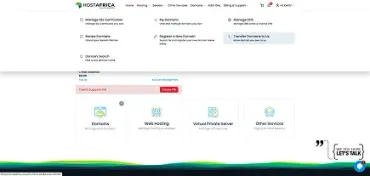
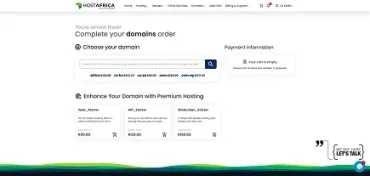
Enter the name of the domain you wish to transfer and search.
The system will now check the status of the domain. If the domain is available for transfer, you should see it in the results as "Taken", along with a "TRANSFER DOMAIN" button.
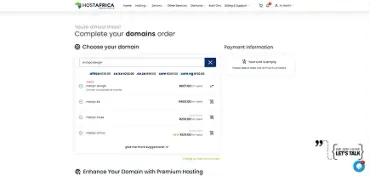
Double-check the domain details to ensure that everything is correct. Then, click "TRANSFER DOMAIN" to see more details about the transfer, including the applicable price and the EPP code. Toggle the "Auto-renew" button as needed, choose whether you want domain warranty and privacy, and enter the EPP code that you obtained in the last section.
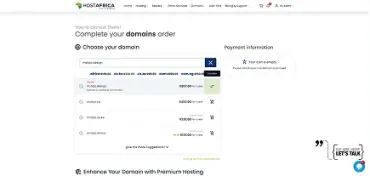
Double check all the data in the "Payment information" section and then click "Pay now".
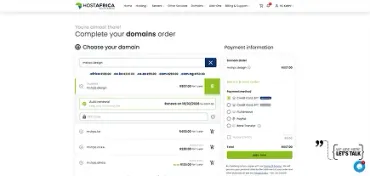
Once the payment has been processed, HostAfrica will initiate the transfer.
You'll receive an email from your current registrar asking you to approve the transfer. Follow the instructions to approve it.

Steps to Take After Transfer
Once your domain transfer is complete, there are several important steps that you should take to ensure that everything is set up correctly:
Verify Transfer Completion
Login to your HostAfrica account and verify that the domain transfer is complete. Also, perform a WHOIS lookup to verify that the registrar information has been updated to the new registrar.

Update DNS Settings
Update or reconfigure your DNS settings as needed to guarantee that your website and email services function correctly. This may include updating A records, CNAME records, and MX records, etc. Remember that DNS changes may take some time to propagate across the internet (usually up to 48 hours).

Set Up Automatic Renewal with HostAfrica
Set up automatic renewal with the new registrar to avoid the risk of your domain expiring, and potentially becoming available for registration by someone else.
Monitor Performance
Periodically check your website's performance and availability. If you notice any issues, address them timely by making the needed tweaks, or by contacting our support.

Enable Domain Lock & Privacy Protection
For added security, consider enabling the domain lock feature to prevent unauthorized transfers. If desired, you may also enable privacy protection to keep your WHOIS information private.

Verify Transfer Completion
Login to your HostAfrica account and verify that the domain transfer is complete. Also, perform a WHOIS lookup to verify that the registrar information has been updated to the new registrar.
Update DNS Settings
Update or reconfigure your DNS settings as needed to guarantee that your website and email services function correctly. This may include updating A records, CNAME records, and MX records, etc. Remember that DNS changes may take some time to propagate across the internet (usually up to 48 hours).
Set Up Automatic Renewal with HostAfrica
Set up automatic renewal with the new registrar to avoid the risk of your domain expiring, and potentially becoming available for registration by someone else.
Monitor Performance
Periodically check your website's performance and availability. If you notice any issues, address them timely by making the needed tweaks, or by contacting our support.
Enable Domain Lock & Privacy Protection
For added security, consider enabling the domain lock feature to prevent unauthorized transfers. If desired, you may also enable privacy protection to keep your WHOIS information private.
Reviews
What our customers say
Quick Answers to Your Domain Queries
Got questions? We've got answers! Dive into our FAQ section for insights and information on our domain transfer services.
What is a domain transfer?
A domain transfer is the process of moving your domain name from your current registrar to HostAfrica, while keeping ownership of the domain.
Who can transfer a domain to HostAfrica?
Anyone who owns a domain and has access to the registrant email address can initiate a transfer, as long as the domain meets the transfer requirements.
How do I know if my domain is eligible for transfer?
Your domain must:
Be registered for more than 60 days
Not be within 60 days of a previous transfer
Be active (not expired or suspended)
How long does a domain transfer take?
Most transfers are completed within 5-7 days, depending on how quickly you approve the transfer request.
Will my website or email stop working during the transfer?
No.
Your website and email services will continue to work as long as your domain remains active and DNS settings are unchanged.
Can HostAfrica help if I get stuck?
Yes.
Need a Hand With Your Transfer?
Our support team is here to help you move your domain to HostAfrica smoothly.