If you’ve recently joined the HostAfrica Affiliate Programme, welcome aboard! One of the most powerful tools at your disposal is the affiliate dashboard—your central hub for tracking visitors, sign-ups, conversions, and commissions.
Whether you're an experienced digital marketer or a beginner learning the ropes, understanding how to navigate the dashboard is key to growing your affiliate income. This global guide will walk you through how to access your dashboard, manage your referral links, interpret performance stats, and understand how payouts work.
Accessing Your Affiliate Dashboard
To get started, follow these simple steps to access the HostAfrica affiliate dashboard:
- Log into your account at hostafrica.com
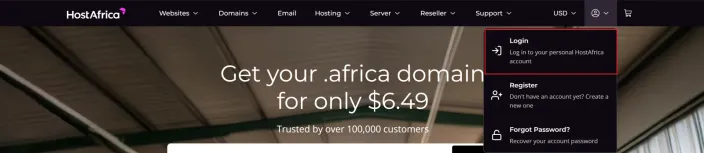
- Navigate to the *Client Area*
- Click the “Affiliates” link in the left sidebar, under “Partner tools”
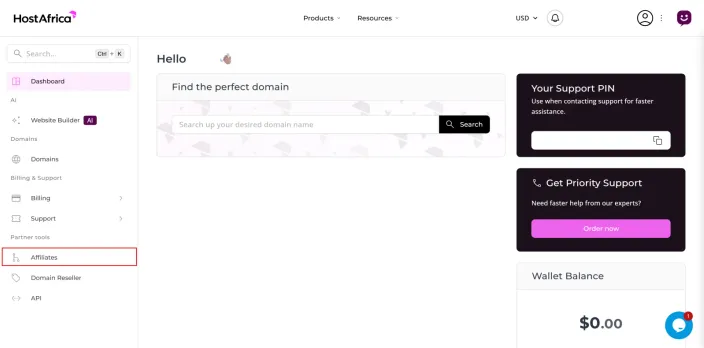
This will open your affiliate reporting dashboard, where you’ll find all your essential tools and performance insights. Pro tip: bookmark this page for easy access anytime.
Understanding Key Stats and What They Mean
The affiliate dashboard provides a clear view of your campaign performance. Here’s what each metric means:
- Visitors: Total number of people who land on HostAfrica through your referral link
- Sign Ups: Number of users who registered after a visit through your link
- Conversion Rate: The share of your visitors who became sign ups
- Commissions: A separate card holds your pending, available and withdrawn amounts

These stats help you identify which channels are converting best, making the dashboard a vital tool for optimisation. Stats update in real time, allowing you to react quickly to what’s working.
Finding and Using Your Referral Link
Your referral link sits in the “Custom Affiliate Link” card on your affiliate dashboard. It includes your unique tracking ID so HostAfrica knows which sign-ups and conversions are credited to you.
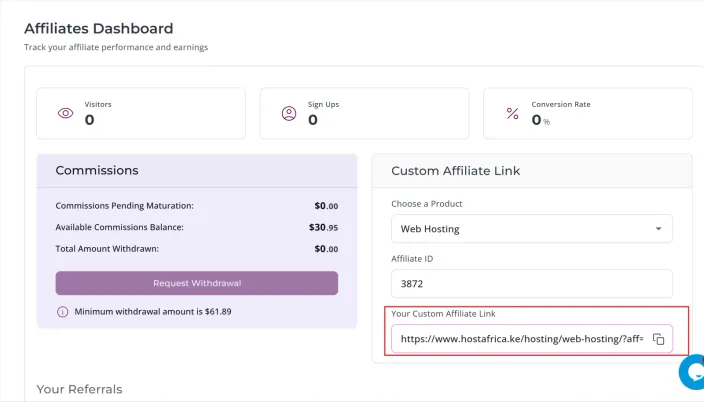
You can promote this link in many ways:
- Blog posts and product reviews
- Email newsletters
- YouTube video descriptions
- WhatsApp groups and Facebook pages
- Instagram bios and LinkedIn posts
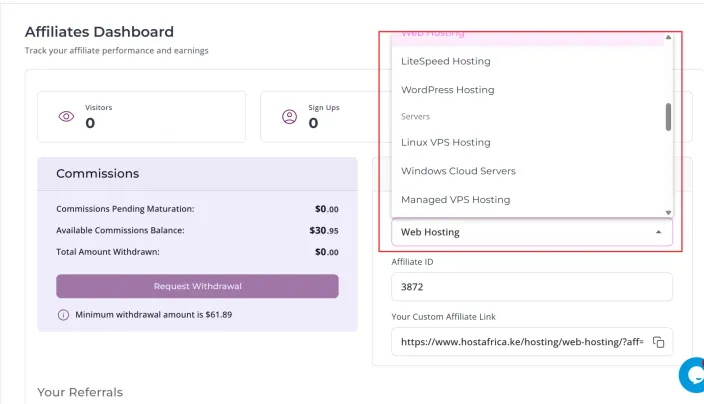
Always test your referral link to ensure it redirects correctly. To promote a specific product such as VPS or Web Hosting, pick it from the “Choose a Product” dropdown in the same card. Your Affiliate ID is already filled in for you.
How Payouts Work in the HostAfrica Affiliate Dashboard
Understanding how you get paid is crucial. Here’s how commissions and payouts work:
- Pending Commissions: These appear after a customer signs up using your referral link. They remain pending for 30 days due to HostAfrica’s money-back guarantee.
- Approved Commissions: Once the 30-day period passes without a cancellation, the commission becomes approved and payable.
- Minimum Payout Threshold: Commissions are paid out once you reach the equivalent of $54.00.
- Payment Methods: Bank transfers or EFTs.
- Schedule: Payments are typically processed at the end of each month.
💡 Read Next: Understanding HostAfrica Commission & Payment Schedules
Best Practices to Monitor Your Progress
Here are some tips to help you get the most out of the affiliate dashboard:
- Check stats weekly to identify trends and top-performing content
- Set monthly referral goals and track progress inside the dashboard
- Use tracked links on high-traffic platforms like TikTok or YouTube
- A/B test promotions across different channels and analyse performance
- Keep a personal spreadsheet of campaigns, channels, and results
💼 Read on: Statista – Affiliate Marketing Benchmarks & Data
Ready to Start Promoting?
Your affiliate dashboard is your command center for growing your income. Log in today, copy your referral link, and begin promoting. With the right strategy and consistent tracking, you’ll be well on your way to earning steady commissions from anywhere in the world.